
WordPress Caching: What It Is, How It Works, and When to Clear It
If you have worked with WordPress, you have probably seen options such as Clear Cache, Purge Cache, or Enable Page Cache.
But what does caching actually mean, and why does it matter for website performance?
In simple terms, caching means storing something that has already been generated so it can be reused instead of creating it again.
This can reduce repeated work for your server and help pages load more efficiently.
Why Does WordPress Need Caching?
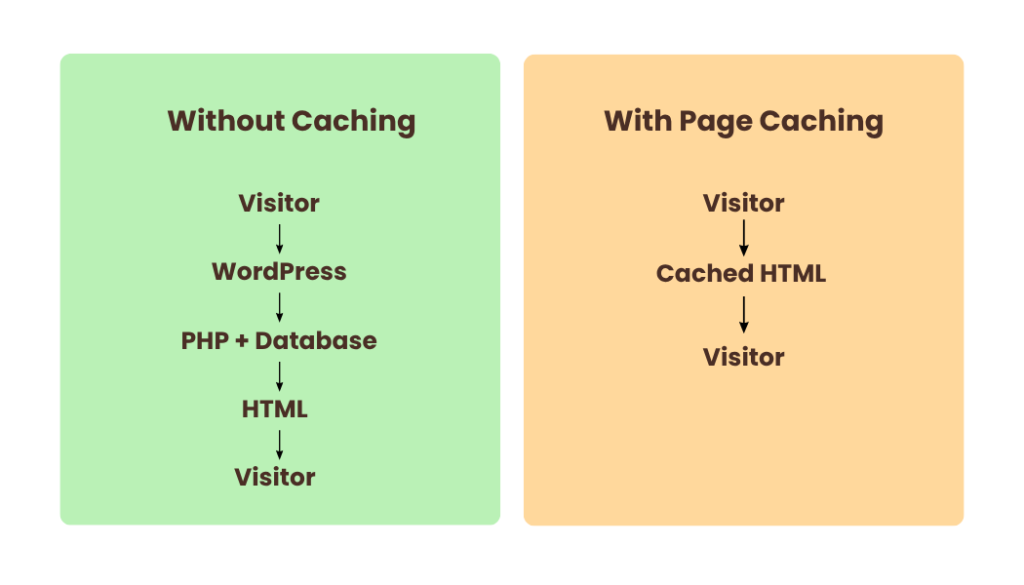
When someone visits a WordPress page, WordPress may need to run PHP, retrieve information from the database, load plugins and themes, and generate the final HTML before sending the page to the visitor.
If the same page is requested many times, the server may have to repeat much of this work. Caching can store the result so it can be reused for another visitor.
The Main Types of WordPress Caching
Caching isn’t just one thing. Different caching systems work at different levels.
1. Page Cache
Page caching stores a ready-to-serve version of a webpage.
Instead of generating the page from scratch for every request, WordPress can serve the cached version when appropriate.
Popular WordPress tools that provide page caching include WP Rocket, FlyingPress, and LiteSpeed Cache.
2. Object Cache
Object caching works differently.
Instead of storing the complete webpage, it stores frequently used pieces of data that WordPress retrieves while processing requests.
Redis and Memcached are commonly used for persistent object caching.
This can reduce repeated database work, especially on websites with more complex or database-heavy operations.
3. CDN / Edge Cache
A CDN can cache and deliver website resources from servers distributed around the world.
For example, Cloudflare and Bunny CDN can help deliver cacheable resources such as images, CSS and JavaScript from locations closer to visitors.
Some setups can also cache HTML at the edge, depending on the configuration.
Page Cache vs Object Cache vs CDN Cache
At this point, the names can start to become confusing. The easiest way to understand them is to look at what each one stores.
The important thing to remember is that these caching layers do different jobs. They can also work together as part of a WordPress performance setup.
Do You Need All Three?
Not necessarily.
A website might use page caching in WordPress, object caching with Redis, and a CDN such as Cloudflare. However, adding more caching tools doesn’t automatically make a website faster.
Your hosting environment may already provide server-level caching, so it is important to understand what is already running before installing another caching plugin.
The goal is not to have the most caching. The goal is to have the right caching for your website.
When Should You Clear the Cache?
You may need to clear or purge cache after making changes to your website.
For example, if you update a page but visitors are still seeing the older version, an old cached copy may be the reason.
However, clearing cache should not be treated as a regular speed optimization technique. Once the cache is cleared, the website needs to build the cached versions again.
Why measure first?
Think of caching as reusing work that has already been done.
Page Cache → stores generated pages
Object Cache → stores frequently used data
CDN Cache → stores and delivers cacheable resources closer to visitors
Once you understand these three layers, caching becomes much less confusing.
And before installing another optimization plugin, ask one simple question:
What exactly am I trying to cache, and where is the current bottleneck?
Frequently Asked Questions
Is caching necessary for every WordPress website?
Not every website needs the same caching setup. A small blog and a large WooCommerce store may have very different caching requirements.
Is Redis the same as a page-cache plugin?
No. Redis is commonly used for object caching, while plugins such as WP Rocket and FlyingPress can provide page caching.
Can I use a CDN with a caching plugin?
Yes. A CDN and a page-cache plugin can work together because they can handle different parts of the delivery process.
Should I install multiple caching plugins?
Usually, you should avoid installing multiple plugins that provide overlapping caching functions unless you understand how they interact. Your hosting environment may already provide some form of caching.
Does clearing cache make my website faster?
Not necessarily. Clearing cache removes stored results, so the website may need to generate and cache them again. Cache purging is useful when troubleshooting or when updated content needs to be served, but it is not itself a speed optimization.
From branding to digital marketing. Our expert team is here to elevate your brand and connect you with your audience.
Categories

Ready To Grow Your Business? Let's Talk
Let’s work together to build strategies that drive results and growth for your business.